
A DNA Rotating LED Screen needs more planning than a standard flat LED wall. The display must show clear visuals while its structure moves, rotates, and stays stable in front of the audience. That means buyers need to review mechanical design, LED configuration, content style, motion control, safety, installation space, and maintenance access before confirming production. Many projects begin with a creative idea. A showroom may need a moving visual centerpiece. A stage may need a dynamic display effect. A commercial space may want a creative LED screen that attracts visitors from different directions. The idea may look simple in a render, but the real project depends on how well the visual system and motion system work together.
Plan the DNA Rotating LED Screen Around the Viewing Scenario
The viewing environment should guide the screen configuration. A rotating LED screen in a shopping mall may be seen from several floors and different angles. A stage display may face the audience most of the time, but movement can change the way light, shadow, and content appear during a show. A showroom display may need closer viewing, so pixel pitch and cabinet seams become more noticeable. Before choosing a DNA Rotating LED Screen, confirm the closest viewing distance, the main audience path, the viewing height, and the content type. Text, product videos, brand graphics, and abstract motion visuals do not need the same display setup. A screen showing product details usually needs finer image quality than a rotating display used mainly for atmosphere.
Observing how people move around
A moving LED display may face different audience positions during each rotation. The team should check whether viewers will see the screen from the front, side, below, or across multiple floors. This affects pixel pitch, brightness, rotation speed, content layout, and installation height.
Match content with real viewing distance
Large graphics and slow visual loops can work well for long-distance viewing. Fine text, product images, and detailed brand content need better resolution and cleaner seams. Content planning should start before production, not after the screen has already been installed.
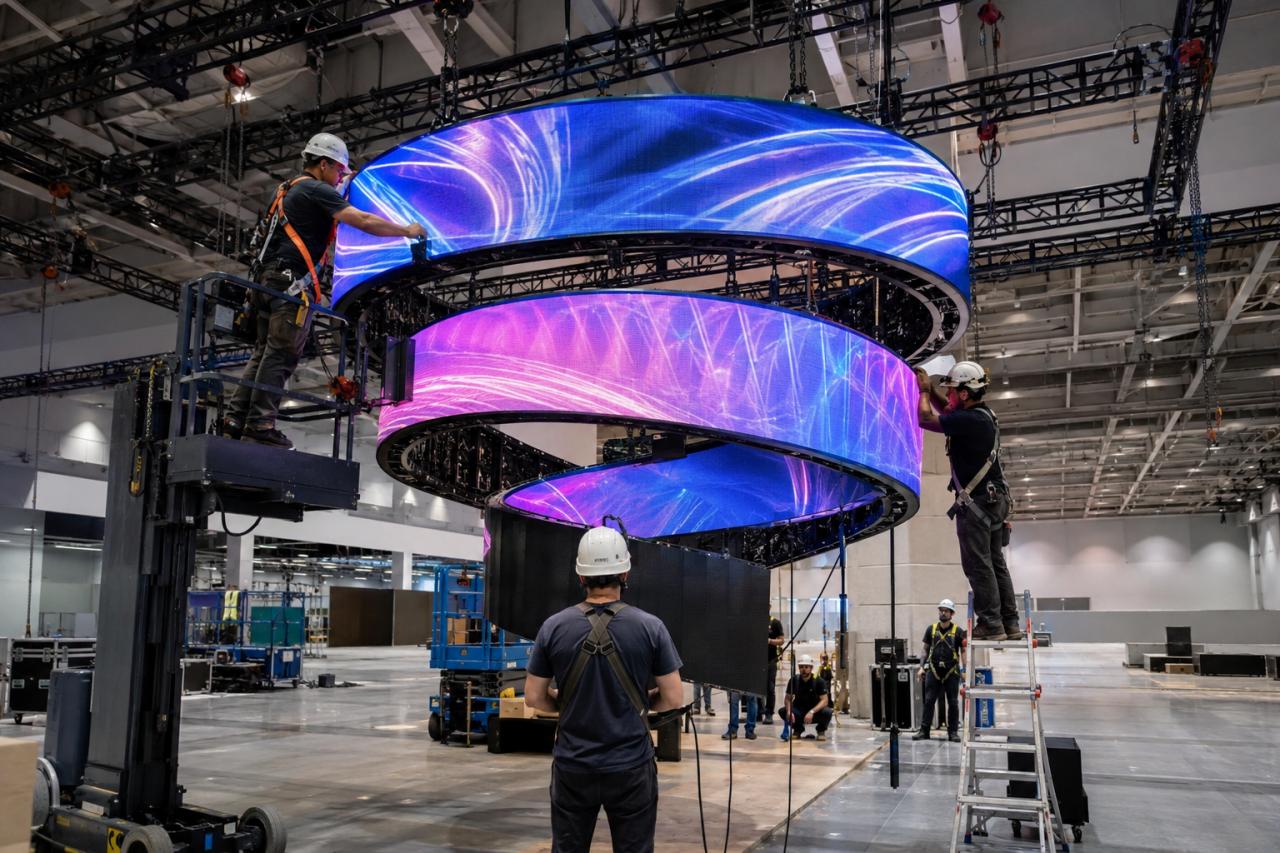
Choose Pixel Pitch for a Rotating LED Screen
Pixel pitch should follow the real viewing distance. A smaller pitch gives clearer detail at close range, but it can increase cost, power demand, and heat management requirements. A wider pitch may work in large public spaces, but it can look rough if people stand close to the display. For a rotating LED screen, motion also affects perceived image quality. As the display moves, viewers may more easily notice cabinet alignment, seams, low-resolution visuals, or uneven brightness. The project team should review screen size, pitch, content type, and rotation distance together instead of choosing the smallest pitch by habit. Habit, sadly, remains one of humanity’s least useful design tools.
Treat Mechanical Structure as Part of Display Quality
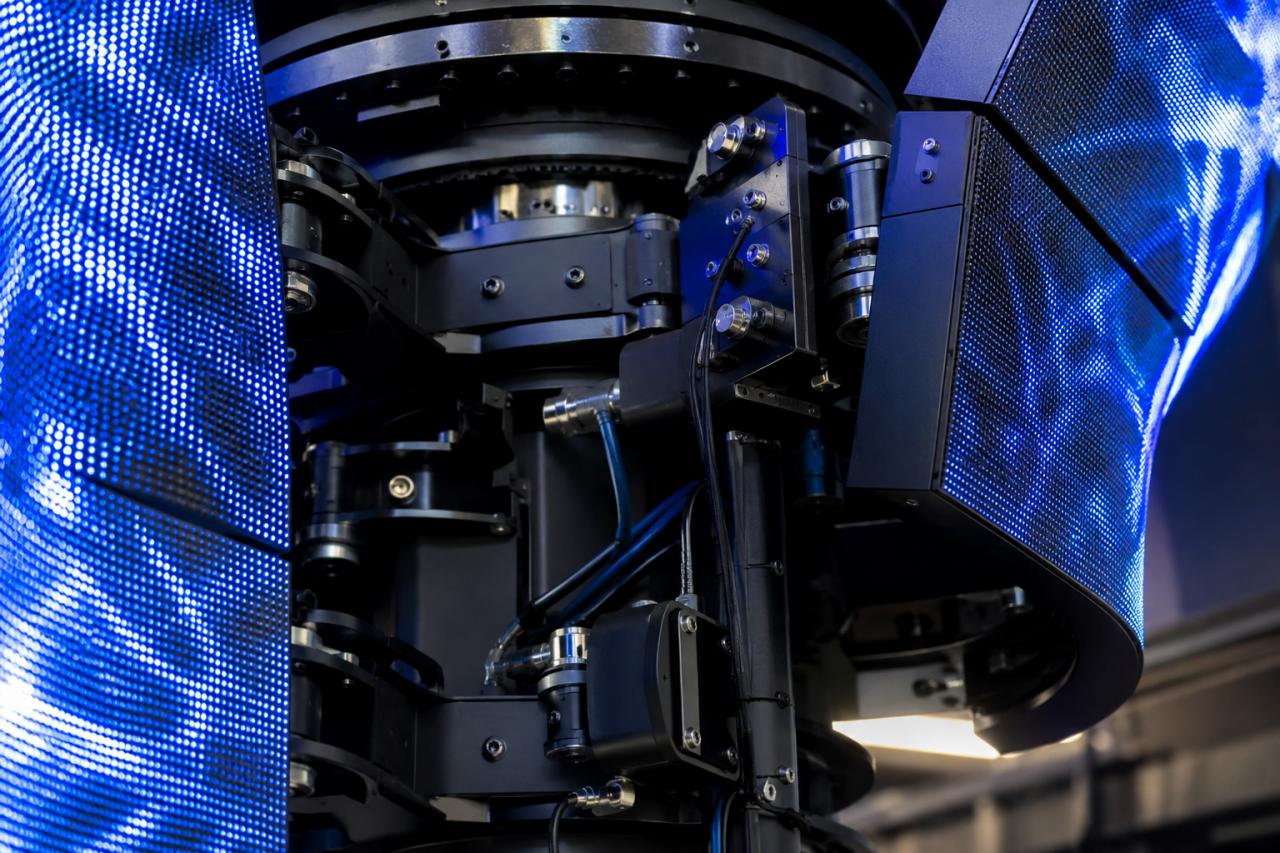
In a moving installation, the structure affects both safety and visual performance. If the rotating frame is not balanced, the display may vibrate. Inaccurate cabinet locking can make seams more visible. If cable routing is not planned early, later service work can become slow or risky. When reviewing LED display products, buyers should ask whether the cabinet structure works for kinetic LED display projects. A standard cabinet may not fit every rotating video wall or custom LED display structure. Weight, module access, cabinet connection, wiring path, and the link between the LED screen and the rotating mechanism all need to be reviewed.
Review cabinet weight and connection accuracy
A moving structure places greater pressure on cabinet design than a fixed installation does. The frame, locking system, and connection points should support stable motion. Good alignment helps the display keep a clean image during rotation.
Confirm cable routing before production
Power and signal cables need safe paths through or around the rotating system. Poor cable routing can cause service problems, signal failure, or movement limits. The design should allow technicians to inspect and replace cables without dismantling the whole structure.
Set Motion Speed Based on Content Use
Motion should support the visual effect rather than fight it. Fast rotation can create energy for stage shows, concerts, and events. Slow movement may work better for retail spaces, museums, showrooms, and brand installations where viewers need time to understand the message. Content designers should prepare visuals for the actual motion pattern. A normal flat-screen video may not work well on a rotating LED structure. Large text, centered graphics, loop timing, brightness transitions, and scene changes should be tested with the movement. If the screen rotates too fast while showing detailed text, the content becomes decoration pretending to be information.
Review Safety and Electrical Planning Early
A DNA Rotating LED Screen combines electrical components with moving parts, so safety planning cannot wait until installation day. The project should define load limits, emergency stop access, motor control logic, power distribution, service procedures, and safe working space for technicians. General electrical safety guidance can help teams think through power protection, maintenance access, and work procedures around display equipment. For public spaces, the system should also support safe isolation during inspection or repair. Safety should cover long-term operation, not only the first installation. Screws, bearings, connectors, cables, power supplies, receiving cards, and control equipment may need periodic inspection. A moving display should have a maintenance plan before it becomes a daily-use installation.
Check Installation Space Before Confirming the Design
A moving LED display needs enough space to rotate safely. The team should calculate the rotation radius, ceiling height, support structure, access path, audience clearance, and service area. If the display will be installed in a mall, museum, exhibition hall, or transport hub, the project may also need to follow building and fire-safety requirements. For stage projects, rigging, transport, assembly time, and repeated installation matter as much as visual performance. For fixed commercial projects, long-term stability and access to service matter more. JR Visual’s LED display solutions can help connect product structure with real application needs.
Design Maintenance Access Before Production
Maintenance access often decides whether a creative LED screen remains useful after installation. A project may look impressive in a render but become difficult to repair if modules, power supplies, receiving cards, or cables cannot be reached safely. Rotating structures make this more important. The screen may need a service position where technicians can stop the system and work safely. Buyers should confirm module access direction, spare parts plan, cable replacement method, fault reporting, and control system access before production. For commercial spaces that run the display every day, downtime can affect traffic, events, and brand presentation. A clear service plan protects both the visual appearance and the installation’s business use.
Ask These Questions Before Ordering a DNA Rotating LED Screen
Before ordering, buyers should prepare clear project information. What is the closest viewing distance? What content will the display show? How fast should the screen rotate? What is the maximum allowed weight? Where will power, signal cables, controllers, and motors be placed? How will the system stop in an emergency? How will technicians reach the display for maintenance? It also helps to review the supplier’s project experience with LED Screen systems, especially for creative or moving installations. A rotating LED project needs more coordination than a standard flat display. Clear information before production helps reduce redesign, installation delays, and unexpected service problems.
A DNA Rotating LED Screen Works Best as a Complete System
A DNA Rotating LED Screen should be planned as a visual, mechanical, electrical, and service system. Pixel pitch, cabinet structure, motion speed, content design, installation space, safety, and maintenance access all affect the final result. When these details are reviewed together, the screen can become a reliable moving visual feature instead of a rotating problem with LEDs attached to it. The goal is not only to make the display move. The goal is to make the movement stable, the content clear, and the installation practical for long-term use.